
Introduction
The jump from reading the text of the Greek New Testament in a printed edition to reading the same text in a manuscript is a big one. Printed editions use a clear, readable font, have an obvious format and structure, and employ standardized spellings and punctuation. Manuscripts, by contrast, do not. Each manuscript is handwritten, and the quality of the handwriting varies from scribe to scribe. Scribes also use a wide range of abbreviations and ligatures that are not found in modern printed editions. Manuscripts frequently contain paratextual material, and some include written corrections and editorial changes added after the manuscript was first produced. All of these phenomena can be overwhelming for students beginning to study Greek New Testament manuscripts. Because of this, I am always on the lookout for new resources to help teach students read New Testament manuscripts. When I taught myself Python, I used a learning platform called Codecademy. Codecademy provided hands-on learning with interactive exercises to go along with each new concept. At the time, I thought that something similar could be created for learning to read Greek New Testament manuscripts. Admittedly, the market for such a platform is undoubtedly small, and I certainly did not have the skills to build it, no matter how helpful a tool it might be. Within the last few weeks, such a tool has appeared!
What is Xeirographa?
Xeirograph is a platform that teaches users how to read Greek manuscripts. The term xeirographa comes from the Greek χειρόγραφα, which means “manuscripts”. It was created by Jacob Peterson, a software engineer who did his PhD at the University of Edinburgh on the manuscripts Gregory Aland 1739 and the text of the Pauline Epistles. Xeirographa is a very simple platform containing twelve lessons exposing users to different kinds of Greek manuscripts. The lessons begin with an easy manuscript and progressively get harder. Users start by examining Majuscule (text written with capital letters) manuscripts that have a clear and easy-to-read text. More difficult Majuscule manuscripts follow until lesson seven, introducing the user to Minuscule (text written with lowercase letters).
The format of the platform is pretty straightforward. On the left side of the screen is the Mirador viewer for iiif images. The image used for the exercise is already loaded into the viewer. On the right side of the screen are input fields for each line to be transcribed. Figure 1 demonstrates this layout.

Figure 1. Layout of exercises.
Each lesson provides instructions on what exactly should be transcribed. For example, in lesson one, there are two columns of text, but the exercise only focuses on the second column. Each lesson introduces a new concept or feature that users will encounter in the transcription.
Greek manuscripts were written scriptio continua, meaning there are no spaces between the words. Because of this, users can type the text as one long line, or spaces can be added. A button at the top can be toggled, forcing users to input spaces between the words as well. After typing the text in the field, users can click the Check button to get immediate feedback on whether they got it correct or not. If the text is correct, a Green check mark appears. If it is wrong, a red x appears instead. After three incorrect attempts, a yellow question mark will appear, and when hovered over, a hint about what is wrong is revealed. An example of this can be seen in Figure 2.
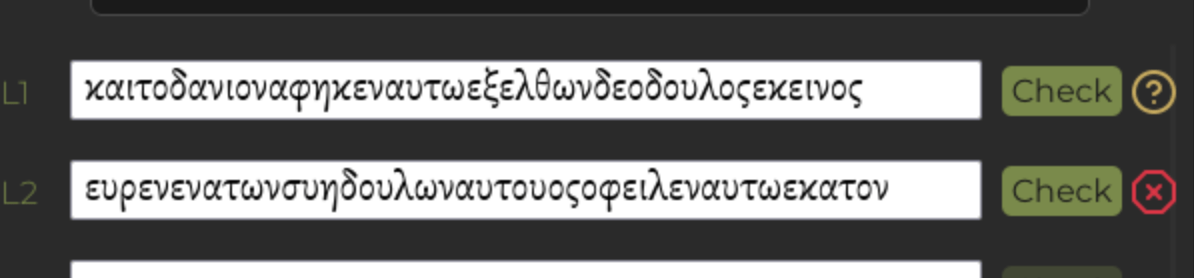
Figure 2. Transcription feedback.
At the very bottom of the transcription side is a button to generate a report. When clicked, a PDF is generated that contains each of the transcription field lines along with an overall score of how many lines you got right. An example of this PDF can be seen in Figure 3. These reports are helpful, especially if a user is being graded on this as an assignment or getting feedback from someone else. A PDF for each lesson can easily be shared with anyone.

Figure 3. Report of a lesson.
Most importantly, users don’t even need to create an account. This platform can be accessed by anyone without the need for any kind of bootstrapping. When I have trained students to read manuscripts, I often need to sign them up for an account on the New Testament Virtual Manuscript Room (NTVMR), show them how to find manuscripts, teach them to use the transcription editor, and manually check every letter to see how they did. With Xeirographa, all I need to do is send them a link, and that’s all. Students will be able to work on different manuscripts of varying difficulty while being exposed to some major concepts they need to grasp to read Greek manuscripts effectively. They get direct feedback on how they are doing, and can send it to me for further feedback.
Finally, Xeirographa has a page for online resources. On this page, there are several links to more resources to help users learn more about paleography, ligatures, scripts, and where to find images of more manuscripts. These resources provide a good starting place for students to explore these concepts more deeply.
Concluding Thoughts
Xeirographa is a great tool for anyone looking to learn how to read Greek Manuscripts. Users can very easily and quickly jump into reading different kinds of manuscripts while gradually gaining more skills. The immediate feedback and ability to share results make it much easier for both the user and anyone who may be training the user to evaluate how the user is doing. There are a couple of bugs I encountered that I have shared with the creator, but nothing major. For instance, the program would not accept my input on a couple of lines, no matter what I tried. I would even add an arbitrary character at the end of the line just to get a hint, and the only thing identified as wrong was the random character I added at the end. Another issue I encountered is that in some of the exercises, the number of lines to complete was wrong. I could not get 100% completion on those exercises, because it indicated I was missing lines when I had in fact done them all. I think there is potential for this platform to grow even more with even more features, but as it stands, I will be utilizing Xeirographa to teach students moving forward.
