
In my last post, I explored how to collate TEI XML transcriptions of Greek New Testament manuscripts, yielding a TEI XML Collation file using the Standalone Collation Editor. In the next few posts, I will demonstrate how to examine and analyze this collation file. This post will introduce the web app Apatosaurus, a tool for creating, editing, visualizing, and analyzing digital apparatus.
Apatosaurus
Apatosaurus is another tool developed by David Flood. He created it to aid his research on the Manuscripts of John of Damascus on Paul.1 The web app is currently in public beta, but anyone can register for an account. Apatosaurus can create a collation manually, but the process can be time-consuming if dealing with more than a dozen manuscripts. David recommends using the Standalone Collation Editor for any collations involving this many or more manuscripts.
We can import a collation into Apatosaurus from TEI XML Collation files. However, TEI is a very flexible format, and Apatosaurus only accepts collation files with the same structure as the output of the Standalone Collation Editor. Therefore, while the Standalone Collation Editor does not have to be used to create the collation file, users should ensure their file matches the output of the Standalone Collation Editor to import it into Apatosaurus successfully.
Importing a Collation
The process of importing a collation is pretty straightforward, and David provides instructions with accompanying GIFs to demonstrate how to do so. In short, under “My Apparatuses”, click on “New Apparatus” on the left-hand side. The user should name the apparatus whatever they want, typically a book or collection. The next screen prompts the user to create sections that the user can also name whatever they want, but the section must include a name and a number. An example would be “Matthew 1”. From here, a collation can be created or imported by clicking on the “Upload Collation File” button. The importation will take a few seconds as the data from the XML file is extracted and converted into a database. We can view the importation status under the user’s profile and the “Background Jobs” tab. Once the importation is complete, smaller sections, such as verses, are created based on the division system utilized in the transcriptions.
Visualization of Collation
Once the import is complete, we can view the collation. Select a verse to view, and a digital apparatus will be displayed. The verse is divided into indices following the variation units configured during the collation stage. Clicking on an index will display the readings and witnesses at that place of variation. For instance, in my collation of the Euthalian Apparatus Prologue to the Catholic Epistles, there is some variation in the inscriptio to the Prologue.

One of the differences is located at indexes 2-10. Manuscript 181 and Zacagni’s edition of the Euthalian Apparatus read, “Presentation of the chapters of the seven catholic epistles by Euthalius, bishop of Sulci, sent to Athanasius, bishop of Alexandria. ” Zacagni relied heavily on 181, and this manuscript appears to be the only one of the twenty-one manuscripts I transcribed that contain details identifying Euthalius as the author. The other twenty-one manuscripts and von Soden’s edition omit this detail, beginning simply with “Prologue”.
Users can further edit the apparatus, including identifying the kinds of readings, adding new readings, or deleting readings. However, this data lives in a database on the website’s backend, so any changes made here will not be reflected in the original collation file. Instead, the collation can be downloaded, and the app will create a new TEI XML Collation file with the updated data.
Analysis of Collation
Besides providing a user-friendly digital apparatus for viewing the collation, several tools for further analysis are available. These tools include Witness querying and the Open-CBGM.
Witness Querying
Manuscript variants can be queried using the Witness Queries tool. We find this tool next to the list of apparatuses. Users can create complex queries, but as a simple example, I would like to quickly identify where manuscript 33 differs from the base text. However, I would like to exclude variations that are lacunose. Such variation occurs twenty-one times. A list of every verse and index is generated and hyperlinked to the spot listed.

Open-CBGM
The Coherence-Based Genealogical Method (CBGM) is “… a method that uses a set of computer tools based in a new way of relating manuscript texts that is designed to help us understand the origin and history of the New Testament text.”2 This method is a genealogical method that can account for contamination while also taking an editor’s textual decisions into account. The Institut für Neutestamentliche Textforschung (INTF) utilizes the CBGM to create the Editio Critia Maior (ECM) of the Greek New Testament. These tools are available to the public; however, there is no way to add or input new/different data in the CBGM online tools. Collation data from published ECM volumes is the only data available.
To address this accessibility issue, Joey McCollum created an open-source implementation called the Open-CBGM that can be run on Linux, MacOS, or Windows. This software allows users to input their own data and apply the CBGM to it. However, the tool is a command-line application that might be a bit intimidating to those without experience in the terminal.
David Flood has integrated the Open-CBGM into Apatosaurus, lowering this barrier significantly. From the list of apparatuses, click on the settings gear wheel button and then “Import to open-cbgm” to input the collation data. This process will take a few minutes, but we can monitor it on the Background Jobs tab in the user’s profile. I highly recommend that users familiarize themselves with the CBGM and Joey’s tool to understand how to use the Open-CBGM on Apatosaurus. Luckily, David has provided a brief overview and several links to helpful resources under the open-cbgm tab.
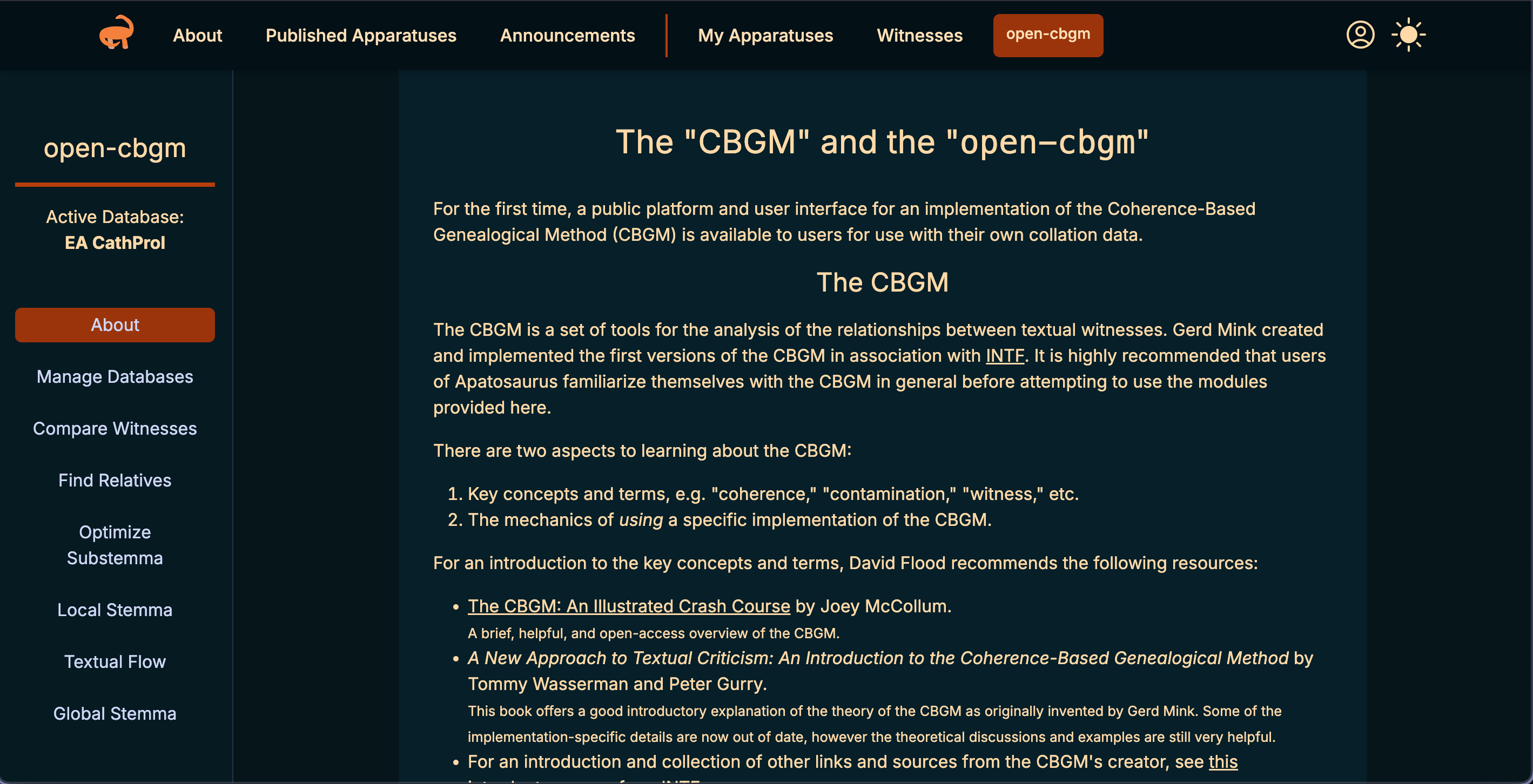
can barely scratch the surface of these tools in the remainder of this post, but information such as the pregenealogical coherence for your witnesses can be explored here. Relatives of witnesses at specific variation units can be queried. The local stemma of readings and global stemma of witnesses can be visualized.
Apatosaurus is an excellent tool for text critics to visualize and analyze their collation of manuscripts. A digital apparatus is generated from the collation file, and complex queries can be executed on the witnesses in the data set. Cutting-edge methodologies and tools are included in a user-friendly interface. While these tools were developed for Greek New Testament manuscripts, they are agnostic to the text being studied. Researchers of any ancient texts can utilize these tools to study the textual history of their texts, as long as their inputs follow the TEI structure used by the other applications covered in my last few posts. In future posts, I will explore the Open-CBGM tools in more depth, demonstrating what kinds of analysis can be accomplished.

 The Digital Orientalist